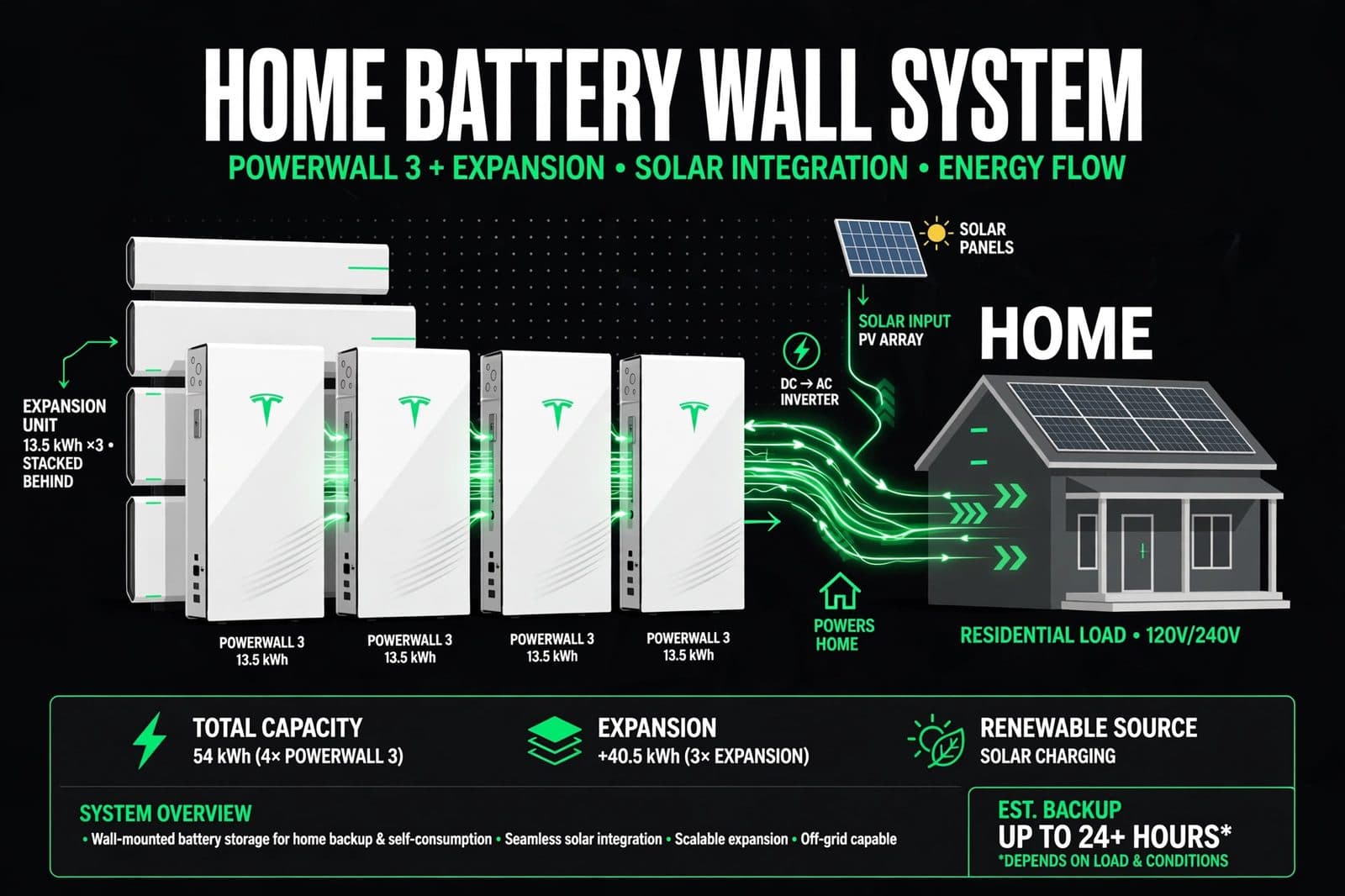
- Tesla caps a Powerwall 3 system at four full units plus three Expansion units, 94.5 kWh in total, and every system has exactly one Leader unit.
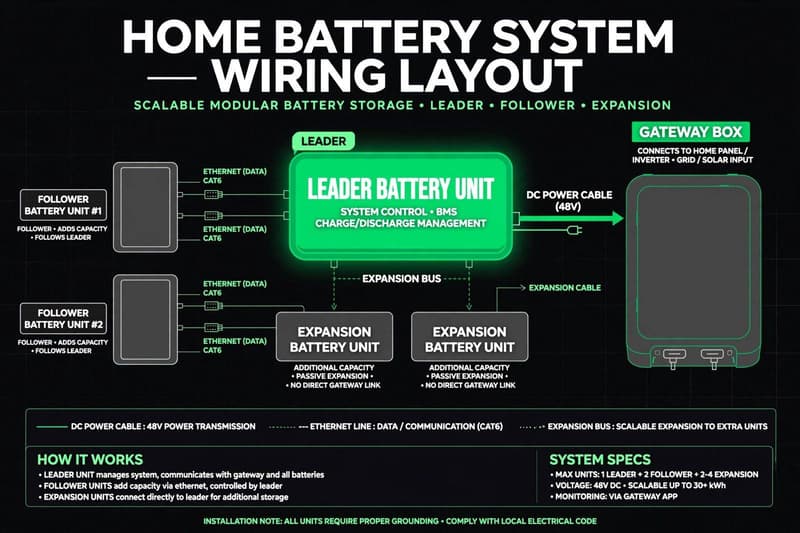
- Expansion units carry storage only, no inverter, and they must connect to the Leader. An Expansion wired to a Follower unit will not function.
- Adding full units raises both storage and power, up to 46 kW continuous. Adding Expansions raises storage only, so the choice between the two depends on whether the home needs more hours or more watts.
Powerwall 3 stacking: building a larger home battery system by adding Powerwall 3 units and Powerwall 3 Expansion units to a single installation. A full Powerwall 3 adds 13.5 kWh of storage and up to 11.5 kW of power, while an Expansion adds 13.5 kWh of storage and no power at all.
The question of how many Powerwall 3 units can you stack has a short answer, 7, and a longer answer that decides whether the system works at all. Tesla’s installation manual sets the ceiling at four Powerwall 3 units plus three Expansion units, and it names one of the full units the Leader. The Leader is the unit the system is commissioned through, and it is the only unit an Expansion may connect to. That single rule is where most multi-unit plans go wrong, because an Expansion bolted behind a Follower looks identical to one bolted behind the Leader and does nothing.
The distinction matters more as systems get bigger. A single Powerwall 3 covers an evening of lights, refrigeration and a few loads. A household that wants two or three days of backup, or a home with a heat pump and an electric water heater that must both run during an outage, needs several units. The manual’s limits decide which combinations are possible, and the arithmetic decides which combination is worth paying for.
- How many Powerwall 3 can you stack
- One Leader runs the system
- How power and energy scale as units are added
- Every configuration from 13.5 kWh to 94.5 kWh
- How many days of backup each configuration buys
- The wiring rules installers follow for multi-unit systems
- What goes wrong when an Expansion lands on a Follower
- When a seventh unit is the wrong answer
How many Powerwall 3 can you stack
Tesla’s installation manual gives the ceiling in plain numbers. A system supports up to four Powerwall 3 units, and up to three Expansion units, for a maximum total of seven units. Each unit, full or Expansion, holds 13.5 kWh of nominal battery energy, so the largest possible system stores 94.5 kWh. The manual states the Expansion limit in the same table as the Powerwall limit, which makes the 7-unit figure a hard ceiling rather than a suggestion.
The two kinds of unit are not interchangeable. A Powerwall 3 is a battery plus an inverter in one enclosure, with up to 11.5 kW of continuous AC output and up to 20 kW DC of solar input. An Expansion is a battery only. Tesla’s system design page states that an Expansion does not include an inverter, cannot be installed without a Powerwall 3, and cannot take a solar connection. The practical consequence is that Expansions add hours of backup and never add watts. A home that trips its battery because the air conditioner and the oven start together needs another full Powerwall 3, while a home that runs out of stored energy at 3 a.m. needs an Expansion.
Compatibility adds one more gate. Tesla’s manual states that Powerwall 3 units with part number 1707000-xx-J or greater are compatible with Expansions. Units built before that revision cannot take an Expansion at all. A homeowner with an early Powerwall 3 who plans to add storage later should check the part number on the unit label before ordering anything, because the installer cannot work around a hardware revision.
One Leader runs the system
Every multi-unit system has exactly one Leader. Tesla’s manual defines the Leader as the Powerwall 3 connected to the gateway via 12V/CAN communication wiring, and it notes that the system is commissioned by connecting to the Leader. Every other Powerwall 3 in the system is a Follower, connected to its neighbours by inter-Powerwall Ethernet wiring.
The Leader is not a more powerful unit. It is the same hardware with a different job: it is the unit the installer talks to when the system is set up, and it is the unit the Expansions attach to. Tesla’s specifications repeat the point in two places, in the multi-unit guide and in the scalability table, which says the Expansion units must be connected to the Leader Powerwall 3 and will not function if connected to a Follower. The repetition is deliberate. In a wall of identical white boxes, the Leader is the one with the gateway cable, and the Expansions must sit behind that box specifically.
The Leader rule also shapes where Expansions can physically go. An Expansion can be mounted behind a Powerwall 3 in a floor-mounted stacked configuration, using Tesla’s stacking kit, or beside it on the wall. The stacking capability is rated for up to three Expansion units behind a Powerwall 3, and only in the floor-mount arrangement. A wall-mounted Expansion sits beside its Powerwall 3 rather than behind it. Either way, the Expansion in question must be the Leader’s Expansion.
How power and energy scale as units are added
Power and energy scale on different tracks, and the table below is the whole decision in one place. Each full Powerwall 3 contributes 13.5 kWh of storage and up to 11.5 kW of continuous AC output, set at installation to one of four levels: 5.8, 7.6, 10 or 11.5 kW. Each Expansion contributes 13.5 kWh and zero power. A system with four full units therefore delivers 54 kWh and up to 46 kW, and adding three Expansions lifts storage to 94.5 kWh while power stays at 46 kW.
| Configuration | Storage (kWh) | Continuous power (kW) | Solar input (kW DC) |
|---|---|---|---|
| 1 Powerwall 3 | 13.5 | 11.5 | 20 |
| 2 Powerwall 3 | 27.0 | 23.0 | 40 |
| 3 Powerwall 3 | 40.5 | 34.5 | 60 |
| 4 Powerwall 3 | 54.0 | 46.0 | 80 |
| 4 Powerwall 3 + 1 Expansion | 67.5 | 46.0 | 80 |
| 4 Powerwall 3 + 2 Expansions | 81.0 | 46.0 | 80 |
| 4 Powerwall 3 + 3 Expansions | 94.5 | 46.0 | 80 |
Three details in the specifications deserve attention. First, the 11.5 kW figure is the top of four installer settings, and the breaker must match the setting: 30 A for 5.8 kW, 40 A for 7.6 kW, and 60 A for 10 or 11.5 kW. Second, off-grid output can be configured to 15.4 kW per unit, but only with solar connected, only when the on-grid rating is 11.5 kW, and only with an 80 A breaker and conductors sized for it. Third, charging from the grid runs at 5 kW for a lone Powerwall 3 and rises to 8 kW when Expansions are attached, which means a 94.5 kWh system needs close to 12 hours to recharge from empty on grid power alone. Solar recharging is faster, since each full unit accepts up to 20 kW DC, but only the full units take solar at all.
Motor starting is the other number that decides real-world behaviour. A Powerwall 3 can start motors rated up to 185 locked-rotor amps, which covers most residential air conditioner compressors. That rating applies per unit, so a two-unit system starts heavier loads more comfortably than a single unit, and the startup surge that can trip a single battery is the exact problem a second full unit solves.
Every configuration from 13.5 kWh to 94.5 kWh
The smallest system, one Powerwall 3, suits a home that wants overnight solar self-consumption and a few hours of backup for lights, refrigeration and phones. Its 11.5 kW of continuous power is already high for a single home battery, which is why one unit runs a surprising number of loads at once. The constraint is duration: 13.5 kWh is less than half a day of average household use.
Two full units, 27 kWh and 23 kW, cover a full day for many homes and handle a heat pump plus the usual evening loads. Three units, 40.5 kWh and 34.5 kW, add a second day of partial backup and enough power for a large home with electric cooking and water heating. Four units, 54 kWh and 46 kW, are the power ceiling: beyond this point no further Powerwall 3 can be added, and any extra storage must come from Expansions.
Expansions make sense once power is sufficient and duration is the gap. A four-unit system with three Expansions stores 94.5 kWh, which is roughly seven times the storage of a single unit with the same 46 kW ceiling. The trade is visible in the table above: the last three rows add 40.5 kWh and zero watts. Tesla prices each Expansion as a separate hardware item, and the expansion pack guide covers the cost per added kilowatt-hour in detail. The stacking decision is therefore a two-step question: how many watts the home needs at its worst moment, then how many hours it needs them for.
How many days of backup each configuration buys
The US Energy Information Administration puts average household electricity use at roughly 30 kWh per day, and that figure turns the storage numbers into days. The table below divides each configuration’s storage by 30 kWh per day. The figures assume the battery starts full and the home keeps using power at its ordinary rate, which is a pessimistic assumption during an outage, when most households cut back sharply. A household running essentials only, lights, refrigeration, phones and a few small loads, commonly uses 10 to 15 kWh a day, which roughly doubles every figure in the table.
| Configuration | Storage (kWh) | Days at 30 kWh/day | Days at 15 kWh/day |
|---|---|---|---|
| 1 Powerwall 3 | 13.5 | 0.5 | 0.9 |
| 2 Powerwall 3 | 27.0 | 0.9 | 1.8 |
| 3 Powerwall 3 | 40.5 | 1.4 | 2.7 |
| 4 Powerwall 3 | 54.0 | 1.8 | 3.6 |
| 4 + 3 Expansions | 94.5 | 3.2 | 6.3 |
The 94.5 kWh maximum buys about three days at ordinary use and about six days on essentials, which is the longest backup a Tesla residential system offers. Whether that is worth the money depends on the local outage pattern. A home that loses power for a few hours a year gains little from the third Expansion, while a home in a wildfire or hurricane zone that has waited days for restoration can justify the full stack. The battery sizing guide works through the same calculation from the load side, starting with the appliances rather than the battery.
One caveat applies to every row: the figures are nominal capacity at 25°C at the beginning of life. Capacity fades with age and cycling, and cold weather trims usable energy. Tesla’s warranty runs 10 years and sets no cycle limit for ordinary home use, which means the warranty clock is the binding limit for most owners. The cycle life guide compares that structure with the cycle-count warranties from Enphase, FranklinWH and EG4.
The wiring rules installers follow for multi-unit systems
The manual’s wiring section is short and strict. All Powerwall 3 units must be connected via Ethernet, in any order, as long as each unit connects to at least one other unit. The Leader connects to the gateway over 12V/CAN wiring. If the system connects to the customer’s router by Ethernet, the router cable goes to the first or last Powerwall 3 in the chain, never to a unit in the middle. Wi-Fi is an alternative for the Leader’s router connection.
The shutdown switch has its own rule. Where a system shutdown switch is required, each Powerwall 3 connects to a dedicated electrical contact on the switch, and the switch must have enough contacts for the number of units installed. The manual illustrates the failure modes: two units sharing one contact, units wired in series, and a second unit left off the switch entirely all fail. A four-unit system needs a switch with four contacts, and the installer sizes it before the units go on the wall.
Physical space is the last constraint. An Expansion measures 43.5 by 24 by 6.6 inches and weighs 261.2 pounds wall-mounted with its cover and bracket, and it is one inch slimmer than a Powerwall 3. A stacked floor-mount arrangement puts up to three Expansions behind a single Powerwall 3, which concentrates more than 500 pounds of battery on one wall position and needs a floor that can take it. Wall-mounted Expansions sit beside their Powerwall 3 instead. Either arrangement needs the same clearances and the same Leader connection.
What goes wrong when an Expansion lands on a Follower
The failure is quiet, which is what makes it expensive. An Expansion connected to a Follower unit will not function, in Tesla’s words, but nothing about the installation looks wrong. The boxes are identical, the harness fits, and the system powers up. The missing storage only shows up when the owner checks the app and finds the capacity short by 13.5 kWh, or when the battery runs out hours earlier than the quote promised during the first outage.
The fix is rewiring. The Expansion harness must move to the Leader, and in a stacked arrangement that can mean unstacking units to reach the connections. Installers who work with multi-unit systems label the Leader during commissioning for exactly this reason. A homeowner accepting a multi-unit installation can ask two questions before signing off: which unit is the Leader, and which Expansions are connected to it. The answers should match the manual’s diagram, and the app should show the full 13.5 kWh per Expansion after commissioning.
The same check applies when adding an Expansion to an existing system. The existing Powerwall 3 may or may not be the right host. In a single-unit system it is the Leader by definition, so the addition is straightforward. In a system that already has two or more units, the installer must confirm which one is the Leader before the Expansion goes on the wall, and must confirm the part number is 1707000-xx-J or later.
When a seventh unit is the wrong answer
The ceiling exists because the system architecture stops scaling. Four inverters is the most the gateway and the communication bus are designed to coordinate, and three Expansions is the most storage one Leader can manage. A home that needs more than 94.5 kWh or more than 46 kW has outgrown a single Powerwall 3 system, and the honest answer is a second independent system or a different product, not a fifth unit that the manual does not support.
Cost is the other reason to stop early. Each Expansion adds 13.5 kWh at a hardware price below a full unit, but the total for a maximum system runs into tens of thousands of dollars before installation, and the cost per kilowatt-hour guide puts that spend in context against the rest of the market. A household should size from the load list, not from the catalogue maximum: count the watts at the worst moment, count the kilowatt-hours across the longest expected outage, and buy the smallest configuration that covers both. The EG4 PowerPro comparison is worth reading for homes where the Powerwall 3 ceiling itself is the problem, since it stacks storage differently.
The stacking question, in the end, is two questions. How many Powerwall 3 units can you stack is answered by the manual: four full units and three Expansions, 94.5 kWh, one Leader. Whether you should stack that many is answered by the load list and the outage history, and for most homes the answer is fewer units than the manual allows.
Frequently asked questions
How many Powerwall 3 can you stack?
Four Powerwall 3 units plus three Expansion units, seven units in total, holding 94.5 kWh. That is the maximum in Tesla’s installation manual, and no configuration beyond it is supported.
How many Leader Powerwall 3 units can a system have?
Exactly one. The Leader is the Powerwall 3 connected to the gateway, and the system is commissioned through it. Every other full unit is a Follower.
Can you add an Expansion to a Follower Powerwall 3?
No. Tesla’s manual states that Expansion units must be connected to the Leader Powerwall 3 and will not function if connected to a Follower unit.
How much power does a four-unit Powerwall 3 system deliver?
Up to 46 kW continuous on grid, at 11.5 kW per unit. Adding Expansions increases storage only; power stays at 46 kW however many Expansions are attached.
How long will 94.5 kWh power a home?
About 3.2 days at the US average of 30 kWh per day, or about 6.3 days at 15 kWh per day running essentials only. Both figures assume the battery starts full.
Sources
- Tesla, Multi-Powerwall 3 Installations, installation manual
- Tesla, Powerwall 3 Specifications, installation manual
- Tesla, Powerwall 3 Expansion Specifications, installation manual
- Tesla, Powerwall Warranty, revision 2.6, effective 6 May 2026
- US Energy Information Administration, How much electricity does an American home use?